About ServiceDesk Plus | On-premises
Employees can find answers or get the services they need, anytime and from anywhere, with the mobile app powered by ServiceDesk Plus. The platform combines ITSM essentials and ITAM with enterprise service management...
Employees can find answers or get the services they need, anytime and from anywhere, with the mobile app powered by ServiceDesk Plus. The platform combines ITSM essentials and ITAM with enterprise service management capabilities. Technicians can also manage requests, approvals, and tasks on the go, be it handling IT, HR, legal, or finance service desks. Here are some of the key features available in the app: Requests: Create, view, edit, and resolve requests. Track the status of tickets, assign technicians, and add notes. Tasks: Break down requests into tasks, assign them, and track progress. Attachments: Add files and images to requests for reference. Work logs: Record time spent on requests. Solutions: Access prerecorded solutions for common issues. Assets: Add assets through bar code/QR code scan, view details, and gain access to remote Windows machines. Calendar integration: View all your pending tickets as events on your mobile calendar app. Change approval: CAB members can quickly approve change requests. Additional features 1. Review and approve service requests and changes from your mobile device. 2. Receive real-time notifications on request assignments, replies, and approvals. 3. Chat with end users right from the app. 4. Create custom views and tailor the app to your preferences. If you haven't installed ServiceDesk Plus yet, go ahead and try out out the fully featured, 30-day, free trial at https://mnge.it/install-servicedesk. Note: This is not a stand-alone application. To log in, your organization must have downloaded and installed the ServiceDesk Plus app or must have an account with ServiceDesk Plus. The ServiceDesk Plus mobile app is only supported with ServiceDesk Plus On-premises version 14000 and above.
Previous Versions
Here you can find the changelog of ServiceDesk Plus | On-premises since it was posted on our website on 2016-11-07 12:52:54.
The latest version is 6.4.7 and it was updated on 2026-10-07 08:02:33. See below the changes in each version.
ServiceDesk Plus | On-premises version 6.4.7
Updated At: 2026-10-06
Changes: Version History 1. Enable two-factor authentication for module approval actions. This adds an extra layer of security by mandating an additional verification step using the OTP. This feature is portal-specific.
2. Base Site now serves as the default site across the application and is listed in the Sites list view.
3. Add a custom logo for the mobile application.
4. View the approval summary for approvals processed in bulk.
5. View the downtime of Changes synced with OpManager.
6. Deep link support is now available on the details pages of Requests, Changes, Tasks, Solutions, Assets, and Problems, and on the approval details pages of Requests, Changes, Releases, Purchase Orders (PO), and Purchase Requests (PR).
7. Added additional permission checks for the Submit for Approval feature. 6.4.7 6d ago 1. Rich text field visibility and color rendering are improved across dark and light themes.
2. Widgets now block screenshots and screen recordings for improved security. 6.4.6 Jul 16 1. Users can now submit requests for approvals.
2. Task comments now support @mentions.
3. Solution descriptions now support inline and embedded videos. 6.4.5 May 25 1. In the Add Request form, you can now populate the Assets field by scanning an asset's QR code, barcode, or RFID tag.
2. When a request is moved to on-hold, you can now select a status and schedule it to be applied automatically.
3. The following values are now retained after you log out:
* Filters (across all modules)
* Last scanned by (Scan Assets page)
* Settings-launch request Screen by Default
* Image upload quality
* Show description by default 6.4.4 Mar 30 Introducing ASWebAuthentication support to strengthen SAML authentication and Azure pre-authentication, ensuring compliance with Conditional Access policies. 6.4.3 Mar 3 1. Users can now scan and upload documents as attachments.
2. The task list does not refresh when the task filter is changed. This is now fixed. 6.4.2 Feb 23 Applicable from ServiceDesk Plus 15200
1. Task comments are enhanced.
2. The following enhancements are introduced in Checklists:
* The Last Updated By information is now displayed for each checklist item.
* Descriptions are now displayed for each fields in checklist items. 6.4.1 Jan 22 1. Problems module is now supported from SDP 14500.
2. You can now manage problems with options to add using templates, edit, view, list, delete, mark as Known Error, and close.
3. The following functionalities are now supported:
*Analysis: Add, edit, and view problem analysis
*Solutions: View solutions
*Tasks: Add, edit, view, and delete tasks
*Worklogs: Add, edit, view, and delete worklogs
*Conversations: Track discussions related to problems
*History: View complete problem history. 6.4 12/24/2025 1. Added bulk approval actions (Approve/Reject) and approval list pagination support. (SDP-14900).
2. Enabled approval workflows for Purchase Requests and Purchase Orders. (SDP-14980)
3. Introduced support for Release approval processes. (SDP-14000)
4. Added Schedule End Time and Change Type to the Change List screen.
5. Included Asset Owner Name in the Asset List for better visibility.
6. Added “Go to Edit Request” support to allow editing mandatory fields during request closure. 6.3 11/26/2025 Our app now works seamlessly on iOS 26 devices. 6.2.1 10/01/2025 1. Dynamic Fonts & VoiceOver Support – Seamless accessibility with adaptive fonts and VoiceOver integration across the entire app.
2. Release Notes in Settings – Access detailed update information directly from the Settings screen. 6.2 09/11/2025 Enhancements in Assets module supported from 15100:
1. Product-Type Asset Filters: Filter assets by product type for faster access in the Assets list view.
2. Bulk Asset Edit: Select and update multiple assets simultaneously by long-pressing the asset cards.
3. Dynamic Asset Forms: Forms now adapt automatically based on product type during edits.
Worklog:
1. Worklog Templates: Technicians can now select templates to quickly log their work as needed.
Attachments:
1. Image Upload Quality: For better storage and performance control, Choose image quality — Original, High, Medium, or Low in the Settings screen.
Change:
1. In the Change Stage, the Downtime field has been updated and renamed to Deployment Details for better clarity. This enhancement is supported from build 14970. 6.1 06/24/2025 We’ve made some exciting updates to enhance your experience:
1. Set Your Default Portal: Personalize your journey by choosing your preferred portal as your default landing page—get where you need to go, faster.
2. Bulk Attachment Downloads: Save time with our new bulk download feature—grab all your attachments in one tap.
3. Email Signature Support: Craft more polished replies with custom email signatures, adding a professional touch to every message. 6.0.9 04/30/2025 1. Cancel request option has been added in the Request module for both Requesters and Technicians.
2. Logged-in users can now mention other users and technicians while adding or editing notes. 6.0.8 02/27/2025 This version supports task additional fields starting from build number 14500. 6.0.7 01/02/2025 1. Added the ability for users to sort requests by their "Due by date".
2. General fixes and stability enhancements. 6.0.6 12/05/2024 This version compatible with server build 14900 for improved performance and seamless functionality. 6.0.5 11/12/2024 1. Added filter support for Announcements.
2. Announcements are displayed as follows (consistent with the web version):
Requester login: Only active announcements are shown.
Technician login: View all announcements (Active, Inactive, Future) with a 'Show All' button. 6.0.4 10/28/2024 Azure Pre-Authentication supported from build 14850. 6.0.3 10/23/2024 1. Added the ability to retrieve the server URL by scanning a QR code directly from the Server URL page.
2. General fixes and stability improvements. 6.0.2 09/25/2024 1. Starting with v6.0, mobile apps will function only from SDP build 14000 or higher.
2. Security enhancements. 6.0.1 08/20/2024 The application UI has been revamped for a better user experience.
Home :
1) Global Search: Users can search for Requests, Solutions, and Announcements across portals using the global search.
2) Add requests from Home Screen.
3) Announcements with recent announcements and "View More" button.
4) My Pending Request Approvals and My Pending Change Approvals with their summary are displayed in Home.
5) Request List View Customisation : Users can customise two request fields in the request list view.
Request :
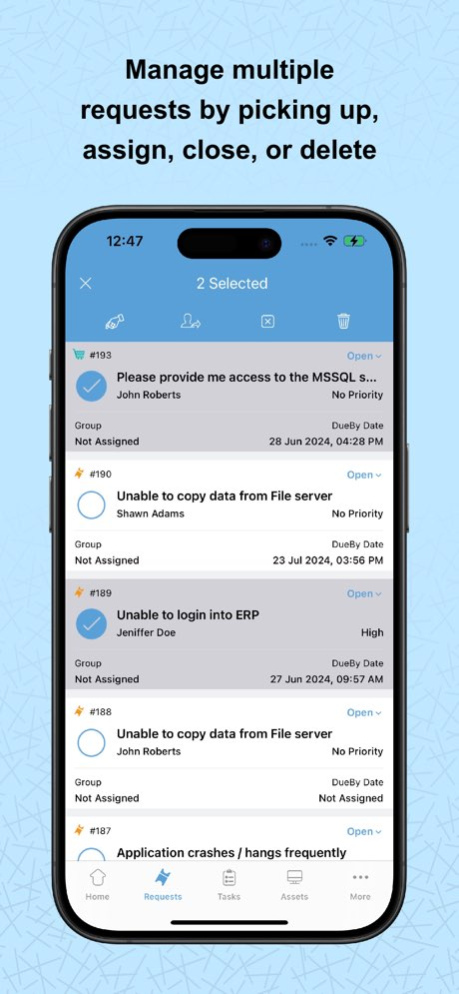
1) Bulk pickup, assign, close, and delete options added. in request list view.
2) Work log timer: Create a work log timer from the request details view.
3) Added Resolution field in Add/Edit Request Form.
4) Forward a request to another user.
5) View request approvals from within the request details page.
6) Requester’s profile picture is displayed in the requests list view.
Approvals :
1) Need Clarification for Approvals: Request more clarification on an approval when approving/rejecting approvals.
2) Added Approvers tab in the request/changes approval details page.
Work log :
1) Work log additional fields: Include work log additional fields when creating or editing a work log.
Task :
1) Task Templates: Configure predefined task templates to help users create tasks instantly.
2) Task Comments: Add or reply to task comments using the mobile app.
Asset :
1) Scan asset/workstation using RFID devices. Currently, only the Zebra's RFID device is supported.
2) Asset scan count has been increased to 25.
General :
1) Dark/Light theme support.
2) In-App Rating & In-App Feedback
iOS Widgets support:
The iOS widget now supports the following entities:
1) Approval summary.
2) Requests View (All requests, My open requests, Unassigned Requests).
3) Approvals (My Pending request approvals, My Pending change approvals). 6.0 07/31/2024 FAFR Support: While creating or editing requests from ServiceDesk Plus mobile app, Administrators can allow field and form rules to be executed by toggling ON Enable Field and Form Rules for Mobile App option under Admin > Templates & Forms > Field and Form Rules.
On updating priority, the Impact and Urgency fields will auto-updated based on the priority matrix.
Scripts cannot be executed via Field and Forms Rules for requests created or edited via mobile app. This feature supported from server build 14501. 5.9 09/15/2023 1. We have provided search option on Approvals list page using approval's title,id and requester name.
2. Photo library items are now sorted by recently added items. 5.8.13 09/12/2023 1. Supported Multi-Factor Authentication from SDP Build 14500.
2. Introduced UAT and Release stages in Change Module from SDP Build 14500.
3. Minor Bug Fixes and Feature Enhancements. 5.8.12 08/30/2023
ServiceDesk Plus | On-premises version 6.4.7
Updated At: 2026-10-03
Changes: Version History 1. Enable two-factor authentication for module approval actions. This adds an extra layer of security by mandating an additional verification step using the OTP. This feature is portal-specific.
2. Base Site now serves as the default site across the application and is listed in the Sites list view.
3. Add a custom logo for the mobile application.
4. View the approval summary for approvals processed in bulk.
5. View the downtime of Changes synced with OpManager.
6. Deep link support is now available on the details pages of Requests, Changes, Tasks, Solutions, Assets, and Problems, and on the approval details pages of Requests, Changes, Releases, Purchase Orders (PO), and Purchase Requests (PR).
7. Added additional permission checks for the Submit for Approval feature. 6.4.7 2d ago 1. Rich text field visibility and color rendering are improved across dark and light themes.
2. Widgets now block screenshots and screen recordings for improved security. 6.4.6 Jul 16 1. Users can now submit requests for approvals.
2. Task comments now support @mentions.
3. Solution descriptions now support inline and embedded videos. 6.4.5 May 25 1. In the Add Request form, you can now populate the Assets field by scanning an asset's QR code, barcode, or RFID tag.
2. When a request is moved to on-hold, you can now select a status and schedule it to be applied automatically.
3. The following values are now retained after you log out:
* Filters (across all modules)
* Last scanned by (Scan Assets page)
* Settings-launch request Screen by Default
* Image upload quality
* Show description by default 6.4.4 Mar 30 Introducing ASWebAuthentication support to strengthen SAML authentication and Azure pre-authentication, ensuring compliance with Conditional Access policies. 6.4.3 Mar 3 1. Users can now scan and upload documents as attachments.
2. The task list does not refresh when the task filter is changed. This is now fixed. 6.4.2 Feb 23 Applicable from ServiceDesk Plus 15200
1. Task comments are enhanced.
2. The following enhancements are introduced in Checklists:
* The Last Updated By information is now displayed for each checklist item.
* Descriptions are now displayed for each fields in checklist items. 6.4.1 Jan 22 1. Problems module is now supported from SDP 14500.
2. You can now manage problems with options to add using templates, edit, view, list, delete, mark as Known Error, and close.
3. The following functionalities are now supported:
*Analysis: Add, edit, and view problem analysis
*Solutions: View solutions
*Tasks: Add, edit, view, and delete tasks
*Worklogs: Add, edit, view, and delete worklogs
*Conversations: Track discussions related to problems
*History: View complete problem history. 6.4 12/24/2025 1. Added bulk approval actions (Approve/Reject) and approval list pagination support. (SDP-14900).
2. Enabled approval workflows for Purchase Requests and Purchase Orders. (SDP-14980)
3. Introduced support for Release approval processes. (SDP-14000)
4. Added Schedule End Time and Change Type to the Change List screen.
5. Included Asset Owner Name in the Asset List for better visibility.
6. Added “Go to Edit Request” support to allow editing mandatory fields during request closure. 6.3 11/26/2025 Our app now works seamlessly on iOS 26 devices. 6.2.1 10/01/2025 1. Dynamic Fonts & VoiceOver Support – Seamless accessibility with adaptive fonts and VoiceOver integration across the entire app.
2. Release Notes in Settings – Access detailed update information directly from the Settings screen. 6.2 09/11/2025 Enhancements in Assets module supported from 15100:
1. Product-Type Asset Filters: Filter assets by product type for faster access in the Assets list view.
2. Bulk Asset Edit: Select and update multiple assets simultaneously by long-pressing the asset cards.
3. Dynamic Asset Forms: Forms now adapt automatically based on product type during edits.
Worklog:
1. Worklog Templates: Technicians can now select templates to quickly log their work as needed.
Attachments:
1. Image Upload Quality: For better storage and performance control, Choose image quality — Original, High, Medium, or Low in the Settings screen.
Change:
1. In the Change Stage, the Downtime field has been updated and renamed to Deployment Details for better clarity. This enhancement is supported from build 14970. 6.1 06/24/2025 We’ve made some exciting updates to enhance your experience:
1. Set Your Default Portal: Personalize your journey by choosing your preferred portal as your default landing page—get where you need to go, faster.
2. Bulk Attachment Downloads: Save time with our new bulk download feature—grab all your attachments in one tap.
3. Email Signature Support: Craft more polished replies with custom email signatures, adding a professional touch to every message. 6.0.9 04/30/2025 1. Cancel request option has been added in the Request module for both Requesters and Technicians.
2. Logged-in users can now mention other users and technicians while adding or editing notes. 6.0.8 02/27/2025 This version supports task additional fields starting from build number 14500. 6.0.7 01/02/2025 1. Added the ability for users to sort requests by their "Due by date".
2. General fixes and stability enhancements. 6.0.6 12/05/2024 This version compatible with server build 14900 for improved performance and seamless functionality. 6.0.5 11/12/2024 1. Added filter support for Announcements.
2. Announcements are displayed as follows (consistent with the web version):
Requester login: Only active announcements are shown.
Technician login: View all announcements (Active, Inactive, Future) with a 'Show All' button. 6.0.4 10/28/2024 Azure Pre-Authentication supported from build 14850. 6.0.3 10/23/2024 1. Added the ability to retrieve the server URL by scanning a QR code directly from the Server URL page.
2. General fixes and stability improvements. 6.0.2 09/25/2024 1. Starting with v6.0, mobile apps will function only from SDP build 14000 or higher.
2. Security enhancements. 6.0.1 08/20/2024 The application UI has been revamped for a better user experience.
Home :
1) Global Search: Users can search for Requests, Solutions, and Announcements across portals using the global search.
2) Add requests from Home Screen.
3) Announcements with recent announcements and "View More" button.
4) My Pending Request Approvals and My Pending Change Approvals with their summary are displayed in Home.
5) Request List View Customisation : Users can customise two request fields in the request list view.
Request :
1) Bulk pickup, assign, close, and delete options added. in request list view.
2) Work log timer: Create a work log timer from the request details view.
3) Added Resolution field in Add/Edit Request Form.
4) Forward a request to another user.
5) View request approvals from within the request details page.
6) Requester’s profile picture is displayed in the requests list view.
Approvals :
1) Need Clarification for Approvals: Request more clarification on an approval when approving/rejecting approvals.
2) Added Approvers tab in the request/changes approval details page.
Work log :
1) Work log additional fields: Include work log additional fields when creating or editing a work log.
Task :
1) Task Templates: Configure predefined task templates to help users create tasks instantly.
2) Task Comments: Add or reply to task comments using the mobile app.
Asset :
1) Scan asset/workstation using RFID devices. Currently, only the Zebra's RFID device is supported.
2) Asset scan count has been increased to 25.
General :
1) Dark/Light theme support.
2) In-App Rating & In-App Feedback
iOS Widgets support:
The iOS widget now supports the following entities:
1) Approval summary.
2) Requests View (All requests, My open requests, Unassigned Requests).
3) Approvals (My Pending request approvals, My Pending change approvals). 6.0 07/31/2024 FAFR Support: While creating or editing requests from ServiceDesk Plus mobile app, Administrators can allow field and form rules to be executed by toggling ON Enable Field and Form Rules for Mobile App option under Admin > Templates & Forms > Field and Form Rules.
On updating priority, the Impact and Urgency fields will auto-updated based on the priority matrix.
Scripts cannot be executed via Field and Forms Rules for requests created or edited via mobile app. This feature supported from server build 14501. 5.9 09/15/2023 1. We have provided search option on Approvals list page using approval's title,id and requester name.
2. Photo library items are now sorted by recently added items. 5.8.13 09/12/2023 1. Supported Multi-Factor Authentication from SDP Build 14500.
2. Introduced UAT and Release stages in Change Module from SDP Build 14500.
3. Minor Bug Fixes and Feature Enhancements. 5.8.12 08/30/2023
ServiceDesk Plus | On-premises version 6.4.6
Updated At: 2026-09-26
Changes: Version History 1. Rich text field visibility and color rendering are improved across dark and light themes.
2. Widgets now block screenshots and screen recordings for improved security. 6.4.6 Jul 16 1. Users can now submit requests for approvals.
2. Task comments now support @mentions.
3. Solution descriptions now support inline and embedded videos. 6.4.5 May 25 1. In the Add Request form, you can now populate the Assets field by scanning an asset's QR code, barcode, or RFID tag.
2. When a request is moved to on-hold, you can now select a status and schedule it to be applied automatically.
3. The following values are now retained after you log out:
* Filters (across all modules)
* Last scanned by (Scan Assets page)
* Settings-launch request Screen by Default
* Image upload quality
* Show description by default 6.4.4 Mar 30 Introducing ASWebAuthentication support to strengthen SAML authentication and Azure pre-authentication, ensuring compliance with Conditional Access policies. 6.4.3 Mar 3 1. Users can now scan and upload documents as attachments.
2. The task list does not refresh when the task filter is changed. This is now fixed. 6.4.2 Feb 23 Applicable from ServiceDesk Plus 15200
1. Task comments are enhanced.
2. The following enhancements are introduced in Checklists:
* The Last Updated By information is now displayed for each checklist item.
* Descriptions are now displayed for each fields in checklist items. 6.4.1 Jan 22 1. Problems module is now supported from SDP 14500.
2. You can now manage problems with options to add using templates, edit, view, list, delete, mark as Known Error, and close.
3. The following functionalities are now supported:
*Analysis: Add, edit, and view problem analysis
*Solutions: View solutions
*Tasks: Add, edit, view, and delete tasks
*Worklogs: Add, edit, view, and delete worklogs
*Conversations: Track discussions related to problems
*History: View complete problem history. 6.4 12/24/2025 1. Added bulk approval actions (Approve/Reject) and approval list pagination support. (SDP-14900).
2. Enabled approval workflows for Purchase Requests and Purchase Orders. (SDP-14980)
3. Introduced support for Release approval processes. (SDP-14000)
4. Added Schedule End Time and Change Type to the Change List screen.
5. Included Asset Owner Name in the Asset List for better visibility.
6. Added “Go to Edit Request” support to allow editing mandatory fields during request closure. 6.3 11/26/2025 Our app now works seamlessly on iOS 26 devices. 6.2.1 10/01/2025 1. Dynamic Fonts & VoiceOver Support – Seamless accessibility with adaptive fonts and VoiceOver integration across the entire app.
2. Release Notes in Settings – Access detailed update information directly from the Settings screen. 6.2 09/11/2025 Enhancements in Assets module supported from 15100:
1. Product-Type Asset Filters: Filter assets by product type for faster access in the Assets list view.
2. Bulk Asset Edit: Select and update multiple assets simultaneously by long-pressing the asset cards.
3. Dynamic Asset Forms: Forms now adapt automatically based on product type during edits.
Worklog:
1. Worklog Templates: Technicians can now select templates to quickly log their work as needed.
Attachments:
1. Image Upload Quality: For better storage and performance control, Choose image quality — Original, High, Medium, or Low in the Settings screen.
Change:
1. In the Change Stage, the Downtime field has been updated and renamed to Deployment Details for better clarity. This enhancement is supported from build 14970. 6.1 06/24/2025 We’ve made some exciting updates to enhance your experience:
1. Set Your Default Portal: Personalize your journey by choosing your preferred portal as your default landing page—get where you need to go, faster.
2. Bulk Attachment Downloads: Save time with our new bulk download feature—grab all your attachments in one tap.
3. Email Signature Support: Craft more polished replies with custom email signatures, adding a professional touch to every message. 6.0.9 04/30/2025 1. Cancel request option has been added in the Request module for both Requesters and Technicians.
2. Logged-in users can now mention other users and technicians while adding or editing notes. 6.0.8 02/27/2025 This version supports task additional fields starting from build number 14500. 6.0.7 01/02/2025 1. Added the ability for users to sort requests by their "Due by date".
2. General fixes and stability enhancements. 6.0.6 12/05/2024 This version compatible with server build 14900 for improved performance and seamless functionality. 6.0.5 11/12/2024 1. Added filter support for Announcements.
2. Announcements are displayed as follows (consistent with the web version):
Requester login: Only active announcements are shown.
Technician login: View all announcements (Active, Inactive, Future) with a 'Show All' button. 6.0.4 10/28/2024 Azure Pre-Authentication supported from build 14850. 6.0.3 10/23/2024 1. Added the ability to retrieve the server URL by scanning a QR code directly from the Server URL page.
2. General fixes and stability improvements. 6.0.2 09/25/2024 1. Starting with v6.0, mobile apps will function only from SDP build 14000 or higher.
2. Security enhancements. 6.0.1 08/20/2024 The application UI has been revamped for a better user experience.
Home :
1) Global Search: Users can search for Requests, Solutions, and Announcements across portals using the global search.
2) Add requests from Home Screen.
3) Announcements with recent announcements and "View More" button.
4) My Pending Request Approvals and My Pending Change Approvals with their summary are displayed in Home.
5) Request List View Customisation : Users can customise two request fields in the request list view.
Request :
1) Bulk pickup, assign, close, and delete options added. in request list view.
2) Work log timer: Create a work log timer from the request details view.
3) Added Resolution field in Add/Edit Request Form.
4) Forward a request to another user.
5) View request approvals from within the request details page.
6) Requester’s profile picture is displayed in the requests list view.
Approvals :
1) Need Clarification for Approvals: Request more clarification on an approval when approving/rejecting approvals.
2) Added Approvers tab in the request/changes approval details page.
Work log :
1) Work log additional fields: Include work log additional fields when creating or editing a work log.
Task :
1) Task Templates: Configure predefined task templates to help users create tasks instantly.
2) Task Comments: Add or reply to task comments using the mobile app.
Asset :
1) Scan asset/workstation using RFID devices. Currently, only the Zebra's RFID device is supported.
2) Asset scan count has been increased to 25.
General :
1) Dark/Light theme support.
2) In-App Rating & In-App Feedback
iOS Widgets support:
The iOS widget now supports the following entities:
1) Approval summary.
2) Requests View (All requests, My open requests, Unassigned Requests).
3) Approvals (My Pending request approvals, My Pending change approvals). 6.0 07/31/2024 FAFR Support: While creating or editing requests from ServiceDesk Plus mobile app, Administrators can allow field and form rules to be executed by toggling ON Enable Field and Form Rules for Mobile App option under Admin > Templates & Forms > Field and Form Rules.
On updating priority, the Impact and Urgency fields will auto-updated based on the priority matrix.
Scripts cannot be executed via Field and Forms Rules for requests created or edited via mobile app. This feature supported from server build 14501. 5.9 09/15/2023 1. We have provided search option on Approvals list page using approval's title,id and requester name.
2. Photo library items are now sorted by recently added items. 5.8.13 09/12/2023 1. Supported Multi-Factor Authentication from SDP Build 14500.
2. Introduced UAT and Release stages in Change Module from SDP Build 14500.
3. Minor Bug Fixes and Feature Enhancements. 5.8.12 08/30/2023 Request filters & reply request API's, have been migrated to V3 in iPad app. 5.8.11 06/15/2023
ServiceDesk Plus | On-premises version 6.4.6
Updated At: 2026-07-23
Changes: Version History 1. Rich text field visibility and color rendering are improved across dark and light themes.
2. Widgets now block screenshots and screen recordings for improved security. 6.4.6 6d ago 1. Users can now submit requests for approvals.
2. Task comments now support @mentions.
3. Solution descriptions now support inline and embedded videos. 6.4.5 May 25 1. In the Add Request form, you can now populate the Assets field by scanning an asset's QR code, barcode, or RFID tag.
2. When a request is moved to on-hold, you can now select a status and schedule it to be applied automatically.
3. The following values are now retained after you log out:
* Filters (across all modules)
* Last scanned by (Scan Assets page)
* Settings-launch request Screen by Default
* Image upload quality
* Show description by default 6.4.4 Mar 30 Introducing ASWebAuthentication support to strengthen SAML authentication and Azure pre-authentication, ensuring compliance with Conditional Access policies. 6.4.3 Mar 3 1. Users can now scan and upload documents as attachments.
2. The task list does not refresh when the task filter is changed. This is now fixed. 6.4.2 Feb 23 Applicable from ServiceDesk Plus 15200
1. Task comments are enhanced.
2. The following enhancements are introduced in Checklists:
* The Last Updated By information is now displayed for each checklist item.
* Descriptions are now displayed for each fields in checklist items. 6.4.1 Jan 22 1. Problems module is now supported from SDP 14500.
2. You can now manage problems with options to add using templates, edit, view, list, delete, mark as Known Error, and close.
3. The following functionalities are now supported:
*Analysis: Add, edit, and view problem analysis
*Solutions: View solutions
*Tasks: Add, edit, view, and delete tasks
*Worklogs: Add, edit, view, and delete worklogs
*Conversations: Track discussions related to problems
*History: View complete problem history. 6.4 12/24/2025 1. Added bulk approval actions (Approve/Reject) and approval list pagination support. (SDP-14900).
2. Enabled approval workflows for Purchase Requests and Purchase Orders. (SDP-14980)
3. Introduced support for Release approval processes. (SDP-14000)
4. Added Schedule End Time and Change Type to the Change List screen.
5. Included Asset Owner Name in the Asset List for better visibility.
6. Added “Go to Edit Request” support to allow editing mandatory fields during request closure. 6.3 11/26/2025 Our app now works seamlessly on iOS 26 devices. 6.2.1 10/01/2025 1. Dynamic Fonts & VoiceOver Support – Seamless accessibility with adaptive fonts and VoiceOver integration across the entire app.
2. Release Notes in Settings – Access detailed update information directly from the Settings screen. 6.2 09/11/2025 Enhancements in Assets module supported from 15100:
1. Product-Type Asset Filters: Filter assets by product type for faster access in the Assets list view.
2. Bulk Asset Edit: Select and update multiple assets simultaneously by long-pressing the asset cards.
3. Dynamic Asset Forms: Forms now adapt automatically based on product type during edits.
Worklog:
1. Worklog Templates: Technicians can now select templates to quickly log their work as needed.
Attachments:
1. Image Upload Quality: For better storage and performance control, Choose image quality — Original, High, Medium, or Low in the Settings screen.
Change:
1. In the Change Stage, the Downtime field has been updated and renamed to Deployment Details for better clarity. This enhancement is supported from build 14970. 6.1 06/24/2025 We’ve made some exciting updates to enhance your experience:
1. Set Your Default Portal: Personalize your journey by choosing your preferred portal as your default landing page—get where you need to go, faster.
2. Bulk Attachment Downloads: Save time with our new bulk download feature—grab all your attachments in one tap.
3. Email Signature Support: Craft more polished replies with custom email signatures, adding a professional touch to every message. 6.0.9 04/30/2025 1. Cancel request option has been added in the Request module for both Requesters and Technicians.
2. Logged-in users can now mention other users and technicians while adding or editing notes. 6.0.8 02/27/2025 This version supports task additional fields starting from build number 14500. 6.0.7 01/02/2025 1. Added the ability for users to sort requests by their "Due by date".
2. General fixes and stability enhancements. 6.0.6 12/05/2024 This version compatible with server build 14900 for improved performance and seamless functionality. 6.0.5 11/12/2024 1. Added filter support for Announcements.
2. Announcements are displayed as follows (consistent with the web version):
Requester login: Only active announcements are shown.
Technician login: View all announcements (Active, Inactive, Future) with a 'Show All' button. 6.0.4 10/28/2024 Azure Pre-Authentication supported from build 14850. 6.0.3 10/23/2024 1. Added the ability to retrieve the server URL by scanning a QR code directly from the Server URL page.
2. General fixes and stability improvements. 6.0.2 09/25/2024 1. Starting with v6.0, mobile apps will function only from SDP build 14000 or higher.
2. Security enhancements. 6.0.1 08/20/2024 The application UI has been revamped for a better user experience.
Home :
1) Global Search: Users can search for Requests, Solutions, and Announcements across portals using the global search.
2) Add requests from Home Screen.
3) Announcements with recent announcements and "View More" button.
4) My Pending Request Approvals and My Pending Change Approvals with their summary are displayed in Home.
5) Request List View Customisation : Users can customise two request fields in the request list view.
Request :
1) Bulk pickup, assign, close, and delete options added. in request list view.
2) Work log timer: Create a work log timer from the request details view.
3) Added Resolution field in Add/Edit Request Form.
4) Forward a request to another user.
5) View request approvals from within the request details page.
6) Requester’s profile picture is displayed in the requests list view.
Approvals :
1) Need Clarification for Approvals: Request more clarification on an approval when approving/rejecting approvals.
2) Added Approvers tab in the request/changes approval details page.
Work log :
1) Work log additional fields: Include work log additional fields when creating or editing a work log.
Task :
1) Task Templates: Configure predefined task templates to help users create tasks instantly.
2) Task Comments: Add or reply to task comments using the mobile app.
Asset :
1) Scan asset/workstation using RFID devices. Currently, only the Zebra's RFID device is supported.
2) Asset scan count has been increased to 25.
General :
1) Dark/Light theme support.
2) In-App Rating & In-App Feedback
iOS Widgets support:
The iOS widget now supports the following entities:
1) Approval summary.
2) Requests View (All requests, My open requests, Unassigned Requests).
3) Approvals (My Pending request approvals, My Pending change approvals). 6.0 07/31/2024 FAFR Support: While creating or editing requests from ServiceDesk Plus mobile app, Administrators can allow field and form rules to be executed by toggling ON Enable Field and Form Rules for Mobile App option under Admin > Templates & Forms > Field and Form Rules.
On updating priority, the Impact and Urgency fields will auto-updated based on the priority matrix.
Scripts cannot be executed via Field and Forms Rules for requests created or edited via mobile app. This feature supported from server build 14501. 5.9 09/15/2023 1. We have provided search option on Approvals list page using approval's title,id and requester name.
2. Photo library items are now sorted by recently added items. 5.8.13 09/12/2023 1. Supported Multi-Factor Authentication from SDP Build 14500.
2. Introduced UAT and Release stages in Change Module from SDP Build 14500.
3. Minor Bug Fixes and Feature Enhancements. 5.8.12 08/30/2023 Request filters & reply request API's, have been migrated to V3 in iPad app. 5.8.11 06/15/2023
ServiceDesk Plus | On-premises version 6.4.5
Updated At: 2026-07-01
Changes: Version History 1. Users can now submit requests for approvals.
2. Task comments now support @mentions.
3. Solution descriptions now support inline and embedded videos. 6.4.5 May 25 1. In the Add Request form, you can now populate the Assets field by scanning an asset's QR code, barcode, or RFID tag.
2. When a request is moved to on-hold, you can now select a status and schedule it to be applied automatically.
3. The following values are now retained after you log out:
* Filters (across all modules)
* Last scanned by (Scan Assets page)
* Settings-launch request Screen by Default
* Image upload quality
* Show description by default 6.4.4 Mar 30 Introducing ASWebAuthentication support to strengthen SAML authentication and Azure pre-authentication, ensuring compliance with Conditional Access policies. 6.4.3 Mar 3 1. Users can now scan and upload documents as attachments.
2. The task list does not refresh when the task filter is changed. This is now fixed. 6.4.2 Feb 23 Applicable from ServiceDesk Plus 15200
1. Task comments are enhanced.
2. The following enhancements are introduced in Checklists:
* The Last Updated By information is now displayed for each checklist item.
* Descriptions are now displayed for each fields in checklist items. 6.4.1 Jan 22 1. Problems module is now supported from SDP 14500.
2. You can now manage problems with options to add using templates, edit, view, list, delete, mark as Known Error, and close.
3. The following functionalities are now supported:
*Analysis: Add, edit, and view problem analysis
*Solutions: View solutions
*Tasks: Add, edit, view, and delete tasks
*Worklogs: Add, edit, view, and delete worklogs
*Conversations: Track discussions related to problems
*History: View complete problem history. 6.4 12/24/2025 1. Added bulk approval actions (Approve/Reject) and approval list pagination support. (SDP-14900).
2. Enabled approval workflows for Purchase Requests and Purchase Orders. (SDP-14980)
3. Introduced support for Release approval processes. (SDP-14000)
4. Added Schedule End Time and Change Type to the Change List screen.
5. Included Asset Owner Name in the Asset List for better visibility.
6. Added “Go to Edit Request” support to allow editing mandatory fields during request closure. 6.3 11/26/2025 Our app now works seamlessly on iOS 26 devices. 6.2.1 10/01/2025 1. Dynamic Fonts & VoiceOver Support – Seamless accessibility with adaptive fonts and VoiceOver integration across the entire app.
2. Release Notes in Settings – Access detailed update information directly from the Settings screen. 6.2 09/11/2025 Enhancements in Assets module supported from 15100:
1. Product-Type Asset Filters: Filter assets by product type for faster access in the Assets list view.
2. Bulk Asset Edit: Select and update multiple assets simultaneously by long-pressing the asset cards.
3. Dynamic Asset Forms: Forms now adapt automatically based on product type during edits.
Worklog:
1. Worklog Templates: Technicians can now select templates to quickly log their work as needed.
Attachments:
1. Image Upload Quality: For better storage and performance control, Choose image quality — Original, High, Medium, or Low in the Settings screen.
Change:
1. In the Change Stage, the Downtime field has been updated and renamed to Deployment Details for better clarity. This enhancement is supported from build 14970. 6.1 06/24/2025 We’ve made some exciting updates to enhance your experience:
1. Set Your Default Portal: Personalize your journey by choosing your preferred portal as your default landing page—get where you need to go, faster.
2. Bulk Attachment Downloads: Save time with our new bulk download feature—grab all your attachments in one tap.
3. Email Signature Support: Craft more polished replies with custom email signatures, adding a professional touch to every message. 6.0.9 04/30/2025 1. Cancel request option has been added in the Request module for both Requesters and Technicians.
2. Logged-in users can now mention other users and technicians while adding or editing notes. 6.0.8 02/27/2025 This version supports task additional fields starting from build number 14500. 6.0.7 01/02/2025 1. Added the ability for users to sort requests by their "Due by date".
2. General fixes and stability enhancements. 6.0.6 12/05/2024 This version compatible with server build 14900 for improved performance and seamless functionality. 6.0.5 11/12/2024 1. Added filter support for Announcements.
2. Announcements are displayed as follows (consistent with the web version):
Requester login: Only active announcements are shown.
Technician login: View all announcements (Active, Inactive, Future) with a 'Show All' button. 6.0.4 10/28/2024 Azure Pre-Authentication supported from build 14850. 6.0.3 10/23/2024 1. Added the ability to retrieve the server URL by scanning a QR code directly from the Server URL page.
2. General fixes and stability improvements. 6.0.2 09/25/2024 1. Starting with v6.0, mobile apps will function only from SDP build 14000 or higher.
2. Security enhancements. 6.0.1 08/20/2024 The application UI has been revamped for a better user experience.
Home :
1) Global Search: Users can search for Requests, Solutions, and Announcements across portals using the global search.
2) Add requests from Home Screen.
3) Announcements with recent announcements and "View More" button.
4) My Pending Request Approvals and My Pending Change Approvals with their summary are displayed in Home.
5) Request List View Customisation : Users can customise two request fields in the request list view.
Request :
1) Bulk pickup, assign, close, and delete options added. in request list view.
2) Work log timer: Create a work log timer from the request details view.
3) Added Resolution field in Add/Edit Request Form.
4) Forward a request to another user.
5) View request approvals from within the request details page.
6) Requester’s profile picture is displayed in the requests list view.
Approvals :
1) Need Clarification for Approvals: Request more clarification on an approval when approving/rejecting approvals.
2) Added Approvers tab in the request/changes approval details page.
Work log :
1) Work log additional fields: Include work log additional fields when creating or editing a work log.
Task :
1) Task Templates: Configure predefined task templates to help users create tasks instantly.
2) Task Comments: Add or reply to task comments using the mobile app.
Asset :
1) Scan asset/workstation using RFID devices. Currently, only the Zebra's RFID device is supported.
2) Asset scan count has been increased to 25.
General :
1) Dark/Light theme support.
2) In-App Rating & In-App Feedback
iOS Widgets support:
The iOS widget now supports the following entities:
1) Approval summary.
2) Requests View (All requests, My open requests, Unassigned Requests).
3) Approvals (My Pending request approvals, My Pending change approvals). 6.0 07/31/2024 FAFR Support: While creating or editing requests from ServiceDesk Plus mobile app, Administrators can allow field and form rules to be executed by toggling ON Enable Field and Form Rules for Mobile App option under Admin > Templates & Forms > Field and Form Rules.
On updating priority, the Impact and Urgency fields will auto-updated based on the priority matrix.
Scripts cannot be executed via Field and Forms Rules for requests created or edited via mobile app. This feature supported from server build 14501. 5.9 09/15/2023 1. We have provided search option on Approvals list page using approval's title,id and requester name.
2. Photo library items are now sorted by recently added items. 5.8.13 09/12/2023 1. Supported Multi-Factor Authentication from SDP Build 14500.
2. Introduced UAT and Release stages in Change Module from SDP Build 14500.
3. Minor Bug Fixes and Feature Enhancements. 5.8.12 08/30/2023 Request filters & reply request API's, have been migrated to V3 in iPad app. 5.8.11 06/15/2023 Chat module API migrated from v1 to v3 (from server build 14300). 5.8.10 05/18/2023
ServiceDesk Plus | On-premises version 6.4.4
Updated At: 2026-05-09
Changes: Version History 1. In the Add Request form, you can now populate the Assets field by scanning an asset's QR code, barcode, or RFID tag.
2. When a request is moved to on-hold, you can now select a status and schedule it to be applied automatically.
3. The following values are now retained after you log out:
* Filters (across all modules)
* Last scanned by (Scan Assets page)
* Settings-launch request Screen by Default
* Image upload quality
* Show description by default 6.4.4 Mar 30 Introducing ASWebAuthentication support to strengthen SAML authentication and Azure pre-authentication, ensuring compliance with Conditional Access policies. 6.4.3 Mar 3 1. Users can now scan and upload documents as attachments.
2. The task list does not refresh when the task filter is changed. This is now fixed. 6.4.2 Feb 23 Applicable from ServiceDesk Plus 15200
1. Task comments are enhanced.
2. The following enhancements are introduced in Checklists:
* The Last Updated By information is now displayed for each checklist item.
* Descriptions are now displayed for each fields in checklist items. 6.4.1 Jan 22 1. Problems module is now supported from SDP 14500.
2. You can now manage problems with options to add using templates, edit, view, list, delete, mark as Known Error, and close.
3. The following functionalities are now supported:
*Analysis: Add, edit, and view problem analysis
*Solutions: View solutions
*Tasks: Add, edit, view, and delete tasks
*Worklogs: Add, edit, view, and delete worklogs
*Conversations: Track discussions related to problems
*History: View complete problem history. 6.4 12/24/2025 1. Added bulk approval actions (Approve/Reject) and approval list pagination support. (SDP-14900).
2. Enabled approval workflows for Purchase Requests and Purchase Orders. (SDP-14980)
3. Introduced support for Release approval processes. (SDP-14000)
4. Added Schedule End Time and Change Type to the Change List screen.
5. Included Asset Owner Name in the Asset List for better visibility.
6. Added “Go to Edit Request” support to allow editing mandatory fields during request closure. 6.3 11/26/2025 Our app now works seamlessly on iOS 26 devices. 6.2.1 10/01/2025 1. Dynamic Fonts & VoiceOver Support – Seamless accessibility with adaptive fonts and VoiceOver integration across the entire app.
2. Release Notes in Settings – Access detailed update information directly from the Settings screen. 6.2 09/11/2025 Enhancements in Assets module supported from 15100:
1. Product-Type Asset Filters: Filter assets by product type for faster access in the Assets list view.
2. Bulk Asset Edit: Select and update multiple assets simultaneously by long-pressing the asset cards.
3. Dynamic Asset Forms: Forms now adapt automatically based on product type during edits.
Worklog:
1. Worklog Templates: Technicians can now select templates to quickly log their work as needed.
Attachments:
1. Image Upload Quality: For better storage and performance control, Choose image quality — Original, High, Medium, or Low in the Settings screen.
Change:
1. In the Change Stage, the Downtime field has been updated and renamed to Deployment Details for better clarity. This enhancement is supported from build 14970. 6.1 06/24/2025 We’ve made some exciting updates to enhance your experience:
1. Set Your Default Portal: Personalize your journey by choosing your preferred portal as your default landing page—get where you need to go, faster.
2. Bulk Attachment Downloads: Save time with our new bulk download feature—grab all your attachments in one tap.
3. Email Signature Support: Craft more polished replies with custom email signatures, adding a professional touch to every message. 6.0.9 04/30/2025 1. Cancel request option has been added in the Request module for both Requesters and Technicians.
2. Logged-in users can now mention other users and technicians while adding or editing notes. 6.0.8 02/27/2025 This version supports task additional fields starting from build number 14500. 6.0.7 01/02/2025 1. Added the ability for users to sort requests by their "Due by date".
2. General fixes and stability enhancements. 6.0.6 12/05/2024 This version compatible with server build 14900 for improved performance and seamless functionality. 6.0.5 11/12/2024 1. Added filter support for Announcements.
2. Announcements are displayed as follows (consistent with the web version):
Requester login: Only active announcements are shown.
Technician login: View all announcements (Active, Inactive, Future) with a 'Show All' button. 6.0.4 10/28/2024 Azure Pre-Authentication supported from build 14850. 6.0.3 10/23/2024 1. Added the ability to retrieve the server URL by scanning a QR code directly from the Server URL page.
2. General fixes and stability improvements. 6.0.2 09/25/2024 1. Starting with v6.0, mobile apps will function only from SDP build 14000 or higher.
2. Security enhancements. 6.0.1 08/20/2024 The application UI has been revamped for a better user experience.
Home :
1) Global Search: Users can search for Requests, Solutions, and Announcements across portals using the global search.
2) Add requests from Home Screen.
3) Announcements with recent announcements and "View More" button.
4) My Pending Request Approvals and My Pending Change Approvals with their summary are displayed in Home.
5) Request List View Customisation : Users can customise two request fields in the request list view.
Request :
1) Bulk pickup, assign, close, and delete options added. in request list view.
2) Work log timer: Create a work log timer from the request details view.
3) Added Resolution field in Add/Edit Request Form.
4) Forward a request to another user.
5) View request approvals from within the request details page.
6) Requester’s profile picture is displayed in the requests list view.
Approvals :
1) Need Clarification for Approvals: Request more clarification on an approval when approving/rejecting approvals.
2) Added Approvers tab in the request/changes approval details page.
Work log :
1) Work log additional fields: Include work log additional fields when creating or editing a work log.
Task :
1) Task Templates: Configure predefined task templates to help users create tasks instantly.
2) Task Comments: Add or reply to task comments using the mobile app.
Asset :
1) Scan asset/workstation using RFID devices. Currently, only the Zebra's RFID device is supported.
2) Asset scan count has been increased to 25.
General :
1) Dark/Light theme support.
2) In-App Rating & In-App Feedback
iOS Widgets support:
The iOS widget now supports the following entities:
1) Approval summary.
2) Requests View (All requests, My open requests, Unassigned Requests).
3) Approvals (My Pending request approvals, My Pending change approvals). 6.0 07/31/2024 FAFR Support: While creating or editing requests from ServiceDesk Plus mobile app, Administrators can allow field and form rules to be executed by toggling ON Enable Field and Form Rules for Mobile App option under Admin > Templates & Forms > Field and Form Rules.
On updating priority, the Impact and Urgency fields will auto-updated based on the priority matrix.
Scripts cannot be executed via Field and Forms Rules for requests created or edited via mobile app. This feature supported from server build 14501. 5.9 09/15/2023 1. We have provided search option on Approvals list page using approval's title,id and requester name.
2. Photo library items are now sorted by recently added items. 5.8.13 09/12/2023 1. Supported Multi-Factor Authentication from SDP Build 14500.
2. Introduced UAT and Release stages in Change Module from SDP Build 14500.
3. Minor Bug Fixes and Feature Enhancements. 5.8.12 08/30/2023 Request filters & reply request API's, have been migrated to V3 in iPad app. 5.8.11 06/15/2023 Chat module API migrated from v1 to v3 (from server build 14300). 5.8.10 05/18/2023 Earlier, the app crashed while coming back to the foreground due to authentication API issue in the server build 11200 or below. It has been fixed. 5.8.9 03/29/2023
ServiceDesk Plus | On-premises version 6.4.3
Updated At: 2026-03-03
Changes: Introducing ASWebAuthentication support to strengthen SAML authentication and Azure pre-authentication, ensuring compliance with Conditional Access policies.
ServiceDesk Plus | On-premises version 6.4.1
Updated At: 2026-01-22
Changes: Applicable from ServiceDesk Plus 15200
1. Task comments are enhanced.
2. The following enhancements are introduced in Checklists:
* The Last Updated By information is now displayed for each checklist item.
* Descriptions are now displayed for each fields in checklist items.
ServiceDesk Plus | On-premises version 6.2
Updated At: 2025-09-11
Changes: Sep 11, 2025
Version 6.2
1. Dynamic Fonts & VoiceOver Support – Seamless accessibility with adaptive fonts and VoiceOver integration across the entire app.
2. Release Notes in Settings – Access detailed update information directly from the Settings screen.
ServiceDesk Plus | On-premises version 6.1
Updated At: 2025-06-24
Changes: Jun 24, 2025
Version 6.1
Enhancements in Assets module supported from 15100:
1. Product-Type Asset Filters: Filter assets by product type for faster access in the Assets list view.
2. Bulk Asset Edit: Select and update multiple assets simultaneously by long-pressing the asset cards.
3. Dynamic Asset Forms: Forms now adapt automatically based on product type during edits.
Worklog:
1. Worklog Templates: Technicians can now select templates to quickly log their work as needed.
Attachments:
1. Image Upload Quality: For better storage and performance control, Choose image quality — Original, High, Medium, or Low in the Settings screen.
Change:
1. In the Change Stage, the Downtime field has been updated and renamed to Deployment Details for better clarity. This enhancement is supported from build 14970.